
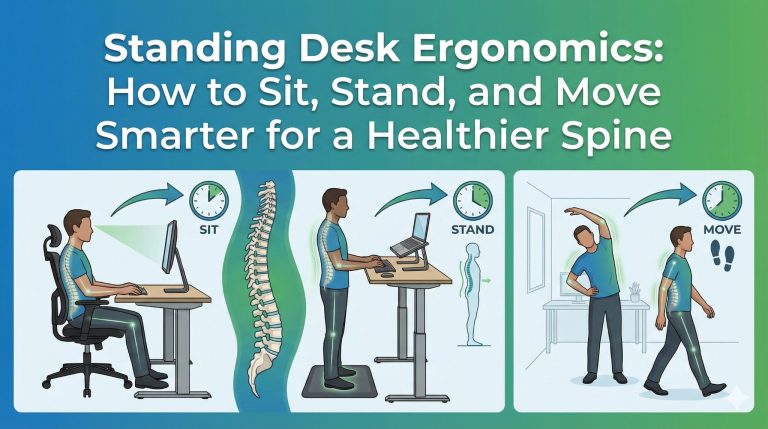
Standing desks have become increasingly popular as more people look for ways to reduce back pain, improve posture, and counteract the negative effects of prolonged sitting. While standing desks can be a powerful tool for spinal health, using one incorrectly can create just as many problems as sitting all day. At Dr. Erin Madonia Family Chiropractic, we emphasize treating the whole body—not just the symptoms. Proper standing desk ergonomics isn’t about choosing between sitting or standing; it’s about movement, balance, and alignment. In this guide, we’ll explore how to alternate between sitting and standing, how to correctly set up your workstation, and how tools like footrests and anti-fatigue mats can reduce strain and fatigue on your nervous system and spine.
Why Standing Desks Matter for Spinal and Nervous System Health
Your spine plays a critical role in protecting your nervous system, which controls every function in your body. Prolonged static postures—whether sitting or standing—can lead to joint stiffness, muscle imbalances, reduced circulation, and increased pressure on spinal discs.
Research shows that alternating positions throughout the day helps:
- Reduce lower back and neck pain
- Improve posture and spinal alignment
- Increase circulation and energy levels
- Reduce muscle fatigue and joint stress
However, simply standing all day is not the solution. Without proper ergonomics, standing desks can contribute to foot pain, hip tension, knee discomfort, and spinal compression.
The Golden Rule: Alternate Between Sitting and Standing
One of the most common mistakes people make with standing desks is standing for too long. The body thrives on movement, not static positions.
Recommended Sit–Stand Ratio
A good rule of thumb is:
- Sit for 30–45 minutes
- Stand for 15–30 minutes
- Repeat throughout the day
This pattern encourages movement while allowing muscles and joints to recover. Listening to your body is key—if you feel discomfort, it’s a sign to change positions.
How to Set Up Your Standing Desk Correctly
1. Monitor Height and Position
Incorrect monitor placement is a major contributor to neck and upper back pain.
Ideal setup:
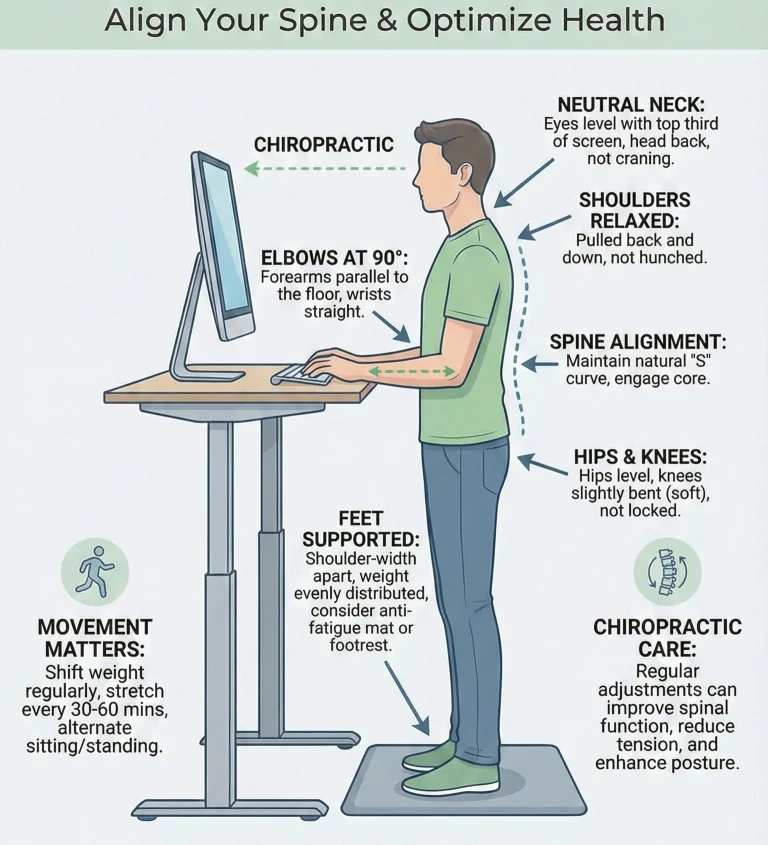
- The top of your screen should be at or slightly below eye level
- Your monitor should be about arm’s length away
- Keep the screen directly in front of you to avoid neck rotation
This positioning helps maintain a neutral neck posture, reducing strain on cervical joints and surrounding muscles.
2. Keyboard and Mouse Placement
Your arms should feel relaxed, not elevated or stretched.
Proper positioning:
- Elbows bent at about 90 degrees
- Forearms parallel to the floor
- Wrists neutral (not bent up or down)
Poor arm positioning can lead to shoulder tension, wrist pain, and nerve irritation, which may affect your overall comfort and productivity.
The Importance of Footrests and Weight Shifting
Standing still for long periods places continuous pressure on the lower spine, hips, and legs.
Use a Footrest
A footrest allows you to alternate placing one foot slightly elevated, which:
- Reduces pressure on the lower back
- Encourages subtle spinal movement
- Decreases hip and leg fatigue
Switch feet every few minutes to promote balance and muscle engagement.
Anti-Fatigue Mats: Small Tool, Big Impact
Standing on hard surfaces for extended periods can lead to foot pain, joint stress, and muscle fatigue.
Anti-fatigue mats help by:
- Absorbing shock
- Improving circulation
- Reducing pressure on the knees, hips, and spine
Look for mats that are firm but cushioned, offering support without feeling unstable.
Posture Tips for Standing Workstations
Even with the right equipment, posture matters.
Maintain a Neutral Standing Posture
- Stand tall with ears over shoulders
- Keep shoulders relaxed, not rounded
- Engage your core gently
- Avoid locking your knees
Poor standing posture—such as leaning on one hip or slouching forward—can lead to uneven spinal loading and muscular imbalances.
There are two types of fibre, and both are important. Soluble fibre, found in foods like oats, beans, apples, and carrots, dissolves in water and helps regulate blood sugar and cholesterol while feeding beneficial gut bacteria. Insoluble fibre, found in whole grains, nuts, and vegetables, adds bulk to your stool and keeps your digestive system moving efficiently.
When your gut bacteria are well-fed with fibre, they produce short-chain fatty acids, particularly butyrate, which has powerful anti-inflammatory properties. These compounds help reduce inflammation not just in your gut, but throughout your entire body, including the tissues around your spine.
Most people need 25-35 grams of fibre daily, but it’s important to increase your intake gradually to avoid digestive discomfort. Focus on whole foods like vegetables, fruits, legumes, whole grains, nuts, and seeds. The diversity of fibre sources is just as important as the quantity—different types of fibre feed different bacterial species, so eating a varied diet promotes a more diverse and resilient microbiome.
Movement Is Medicine: Keep Your Body Active
Chiropractic care emphasizes movement as a key factor in spinal health.
Simple Desk Movements to Try
- Gentle spinal twists every hour
- Shoulder rolls and neck stretches
- Short walking breaks
- Calf raises or ankle circles while standing
These small movements help keep joints lubricated, muscles engaged, and the nervous system functioning optimally.
How Chiropractic Care Supports Desk Workers
Even with perfect ergonomics, repetitive daily stress can accumulate in the spine and nervous system. Chiropractic care helps:
- Improve spinal alignment
- Restore joint mobility
- Reduce nerve interference
- Enhance posture awareness
Regular chiropractic adjustments, combined with ergonomic improvements, create a proactive approach to preventing pain rather than simply reacting to it.
Final Thoughts: Standing Desks Are a Tool—Not a Cure
Standing desks can significantly improve comfort and spinal health when used correctly. The key lies in balance: alternating positions, optimizing ergonomics, and incorporating regular movement throughout the day.
At Dr. Erin Madonia Family Chiropractic, we believe that small, consistent changes—both at work and in daily habits—can lead to long-term improvements in posture, nervous system function, and quality of life.
If you’re experiencing discomfort despite ergonomic adjustments, a personalized chiropractic assessment can help identify underlying issues and support your body’s natural ability to heal and function at its best.
Dr. Erin Madonia has been providing chiropractic care to the King West neighbourhood since 2014, specializing in safe and effective relief of spinal complaints while optimizing central nervous system function. To learn more or schedule an appointment, contact us at dr.erin.madonia@gmail.com or visit our office at 130 Spadina Ave, Suite 808, Toronto.